
Two offices, one network
A client with a main office and a branch wanted staff at either site to work as if they were sitting in the other. We put an IOPSTOR firewall at each office and joined them with one encrypted tunnel, running over the internet lines they already had.
The problem
The client runs two offices. Each had its own internet connection and nothing linking the two. Staff at the branch could not reach the file shares, printers and business systems in the main office, and the main office could not reach anything at the branch.
They wanted the two sites joined directly, securely and as fast as their lines allow, so that someone at the branch feels like they are in the main office, and the other way round.
What it had to do
- One direct, encrypted link between the two office networks.
- As much throughput as the internet lines allow.
- Access both ways. Branch staff reach main-office systems, and main-office staff reach branch systems, as if they were on site.
- No new lines. It had to run on the Airtel and Jio connections already in place.
What they had
The main office has two internet lines and the branch has one. Only one of the three has a fixed public IP address.
| Office | Line | Public IP | Router's default range |
|---|---|---|---|
| Main | Airtel | Static | 192.168.1.0/24 |
| Main | Jio | Dynamic | 192.168.29.0/24 |
| Branch | Airtel | Dynamic | 192.168.1.0/24 |
Two details in that table shape the whole design. The Airtel static IP at the main office is the only address that never changes, so it is the one place the branch can always find.
The other is the last column. Both Airtel routers hand out 192.168.1.0/24, so if each office kept its default, the two networks would have identical addresses and could not be routed to each other. We gave each office its own range, 192.168.20.0/24 at the main office and 192.168.30.0/24 at the branch.
Before we installed anything
We asked Airtel to switch the routers at both offices to bridge mode. In bridge mode the Airtel box stops acting as a router and passes the connection straight through, and the IOPSTOR firewall dials the line itself over PPPoE. At the main office the static IP arrives on the firewall over that same PPPoE session.
Each firewall now holds its public IP directly. There is no router in front of it to configure, and no port forwarding anywhere. The Jio line only carries internet traffic, so its router stays as it is.
The design
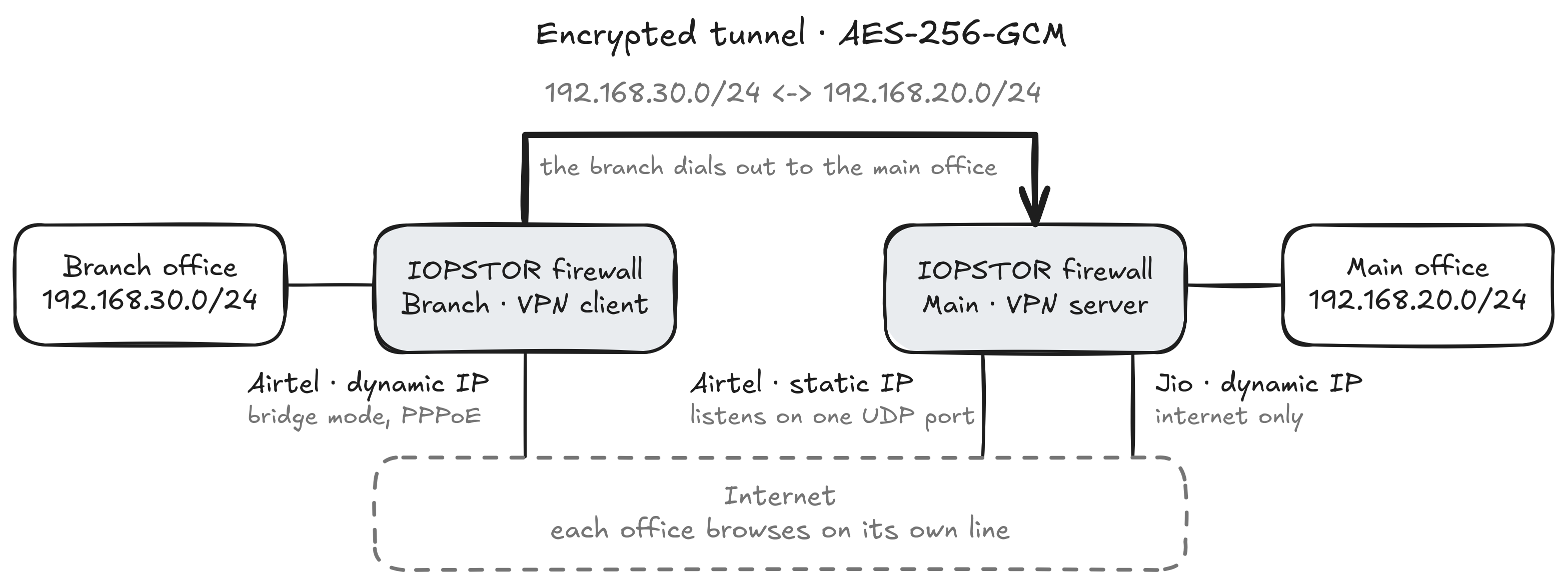
There is an IOPSTOR firewall at each office and one VPN tunnel between them.
The main office firewall is the VPN server. It listens on its Airtel static IP and nowhere else. The branch firewall is the client. It dials out to that static IP and holds the tunnel open. Because the branch only ever connects outward, nothing at the branch is open to the internet.
The tunnel is routed (Layer 3, tun mode). Each office keeps its own address range and the firewalls route between them. Only traffic between 192.168.20.0/24 and 192.168.30.0/24 goes through the tunnel. Everything else, such as browsing, email and cloud apps, leaves each office on its own internet line. At the main office, Airtel and Jio share that internet load, and each takes over if the other fails.
| One direct, encrypted link | One tunnel joins the two firewalls. Both hold certificates issued by one private certificate authority, S2S-CA. A shared TLS key sits on top of the certificates, and the main office drops any connection attempt that does not carry it. Traffic inside the tunnel is encrypted with AES-256-GCM (Advanced Encryption Standard in Galois/Counter Mode). |
|---|---|
| As much throughput as the lines allow | Internet traffic stays local, so the tunnel carries only traffic between the offices. On 1 Gbps broadband the tunnel tops out at around 850 to 930 Mbps. The slower of the two lines sets the ceiling. |
| Both ways, as if on site | Each firewall has a route to the other office and rules that let its traffic through, in both directions. Each also forwards DNS lookups for the other office's domain to that office, so staff can open a server or printer by name as well as by IP address. |
| The lines already in place | The branch's Airtel line dials the tunnel. At the main office, Airtel carries the tunnel, and Airtel and Jio share the internet. No new connection was needed. |
Why we built it this way
- The branch only dials out. It needs no open port, and the tunnel depends on just one fixed address, the main office's static IP.
- One UDP port is open, at the main office only. There is no port forwarding at either site.
- Two keys to get in. A box can join only if it holds a certificate signed by S2S-CA and the shared TLS key.
- The tunnel is kept for office traffic. Each office browses on its own line, so one site's browsing does not slow the other's.
- Names work across sites. Staff reach the other office by name as well as by IP address.
- Room to grow. Adding another branch later takes one more certificate and one more client entry on the main firewall.
Running two offices that should work as one?
An IOPSTOR firewall at each site can join them over the internet lines you already pay for.